


Little Panda: Princess Party
4.0158.00 Reviews
App Specs
- Version
- 8.75.00.01
- Updated On
- License
- Free
- Downloads
- 10,000,000+
- Developer
- BabyBus
- Categories
- Educational
- Platform
- Android, iOS
Screenshots


 Analysis by AppCompare
I see Little Panda: Princess Party as a short, playful choice for children who enjoy dressing up a character and getting ready for a pretend celebration. Its appeal is specific: this is an educational game built around a princess-party theme, not a broad collection of lessons or a deep story. I’d consider it when a child wants a cheerful activity with creative choices, while keeping expectations modest about how much variety or structured learning a small mobile game can offer.
What the free access means in practice
The game is free to download, which makes it easy to try before deciding whether it suits your child. It also offers in-app purchases priced from $0.99 to $2.49 per item, so “free” describes the initial access rather than a guarantee that every purchase option is included at no cost. I’d let a child explore only with an adult nearby at first, especially if the device can make purchases.
That distinction matters for family budgeting. You can start without paying, then judge whether the activities hold a child’s attention before considering any optional purchase. I wouldn’t treat the listed purchase range as a reason to buy: the useful question is whether the free experience already fits the kind of play your child wants. The game is rated for Everyone, but an age label doesn’t replace a parent’s judgment about a particular child or how they use a device.
Who is likely to get the most from it?
I’d put it on the shortlist for a young child who likes pretend play, colorful characters, party preparations, and choosing how a character looks. It can also work for a parent who wants a low-pressure activity to share: ask the child why they picked a particular outfit or what cake they would make for a celebration. That turns tapping through activities into a small conversation rather than simply handing over a screen.
It is less suited to a child looking for a challenge that steadily gets harder, a long narrative, or a game focused on reading and formal practice. The educational element is presented through play, so I would see it as a light complement to hands-on activities, not a substitute for books, puzzles, art materials, or adult-led learning. If your child is most engaged by building, racing, or solving tougher puzzles, another kind of game may hold attention better.
A realistic way to use it at home
One practical moment for it is a short wait while dinner is being prepared or a quiet break after a busy outing. I’d sit nearby, let the child choose an activity, and use the party theme to connect screen play with real life: compare the colors on an outfit with something in the room, or talk about what goes into a cake before making a snack together another day. There is no need to turn every session into a lesson; a little conversation is enough to make the play feel shared.
A useful boundary is to agree on the stopping point before opening the game. The activities may encourage a child to keep exploring, and a clear transition—such as playing until it is time to set the table—can make the device easier to put away. This is a parent’s routine rather than a special game feature, but it helps keep a pleasant distraction from becoming an argument about screen time.
Worth Reading Before You Choose

EA SPORTS FC Mobile 26 Is a Bigger Football Game, but It Takes Time

Flipboard Shows What News Apps Must Do Beyond the Feed

Switching to Android Auto Means Rethinking Your Driving Routine

Google Calendar Makes a Crowded Week Easier to Manage

Ludo King Makes the Most of the Minutes Between Plans

Baby Panda World Brings Quick Play to Modern Phones, but Its Game Library Feels Busy
How it compares with other children’s games
Compared with a typical coloring app, the party-preparation theme gives children more than one kind of pretend task: styling and cake-making are described as separate activities, so the play can shift between appearance and food. Compared with a structured preschool-learning app, it sounds more like imaginative play with educational ideas woven in than a sequence of lessons. That difference is a strength for children who resist drills, but a drawback for families seeking a clear curriculum or measurable practice.
It also differs from open-ended dollhouse or craft games, where the main attraction is often unrestricted creation. Here, the princess party provides a recognizable frame for choices, which can help a child who likes having a simple goal. On the other hand, a child who wants to invent an entirely different world may prefer a sandbox-style game or physical dress-up and art supplies. I would choose based on the child’s preferred kind of play, not on the promise of the educational label alone.
Small choices that make play more useful
For a child who tends to rush through taps, I’d slow the session down by asking them to describe one choice before making the next: which outfit feels right for the party, or what colors they want on the cake? This makes the dress-up and baking activities opportunities to name colors, compare options, and explain a preference. It is a simple way to bring more thinking into the experience without pretending that the game itself is a full lesson.
I’d also let the child lead rather than correcting every choice. The value of a pretend party is partly that the child can make decisions without worrying about getting a real recipe or outfit “right.” If they lose interest in one activity, switching to another may be more helpful than insisting they finish. That flexibility is especially useful during a short wait, when the aim is a calm diversion rather than completing a task.
Where the trade-offs show up
The focused theme is also the main limitation. A child who enjoys princesses, parties, and make-believe may find the activities inviting; one who does not may have little reason to stay. The educational content is subtle, which keeps play light but means parents should not expect sustained teaching in colors, shapes, or counting from every session. I’d pair it with real-world conversation or play if learning is the main goal.
There is also a practical difference between a child playing alone and an adult joining in. The interface is described as accessible to younger users, but easy navigation does not necessarily make every device decision appropriate for a young child. I’d check the purchase settings and supervise initial use rather than assuming that a child-friendly presentation settles every parental concern. If you want a completely hands-off, long-form activity, this may not be the right fit.
What the play feels like
First off, the visuals in Little Panda: Princess Party are downright charming. As soon as I opened the app, I was greeted by vibrant colors and adorable characters that are sure to catch any child’s eye. The design feels like a cross between a children’s storybook and a Saturday morning cartoon, which is perfect for its target audience.
The premise is simple yet delightful: your child gets to help the little panda princess prepare for a grand party. This involves a variety of fun mini-games that are not only entertaining but also educational, subtly teaching kids about colors, shapes, and even basic problem-solving.
Mini-Games Galore
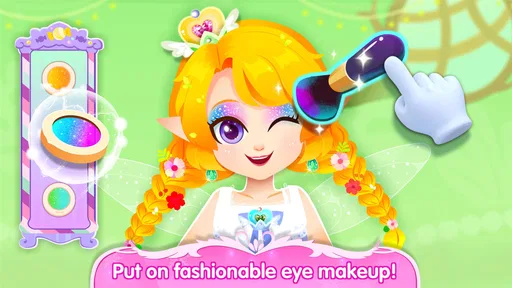
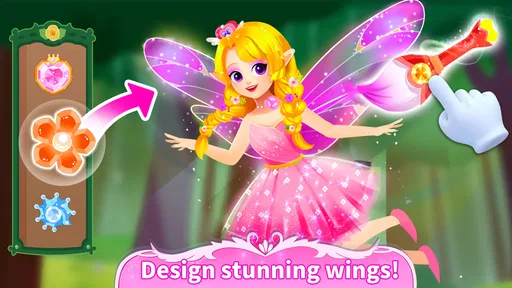
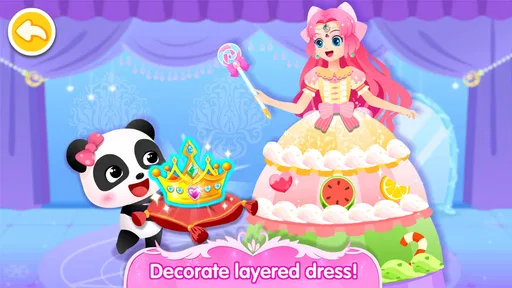
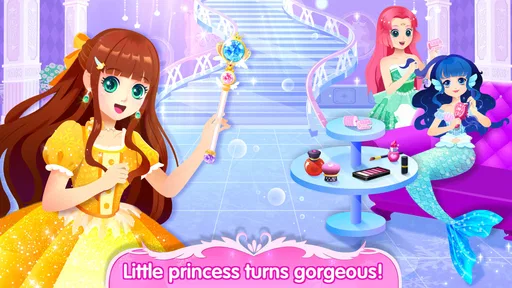
The app is packed with a plethora of activities. From dressing up the panda princess in a selection of dazzling outfits to baking colorful cakes, each mini-game is designed to engage children while stimulating their creativity. The dress-up game is particularly enchanting, offering a wide range of outfits and accessories that kids can mix and match. It’s like a digital version of playing dress-up, minus the mess.
The cake baking mini-game is another highlight. Kids get to choose their ingredients, mix them up, and watch their culinary creations come to life. It's a fun way to introduce them to the idea of cooking, and hey, who doesn’t love a good virtual cake?
Intuitive and Kid-Friendly Interface
The interface is as user-friendly as it gets. The app’s developers did a stellar job of ensuring that navigation is intuitive, even for younger users. Large buttons, clear instructions, and visual cues make it easy for kids to play independently, which is a big plus for parents.
I also appreciate the lack of intrusive ads. There’s nothing worse than a pop-up ad ruining a child’s gaming experience. Thankfully, Little Panda: Princess Party keeps things clean and unobtrusive, which is a breath of fresh air.
Sound and Music: A Delightful Soundtrack
The music and sound effects are a delightful addition that further immerses players in the magical world. The cheerful tunes and sound effects are catchy without being annoying, which is crucial for any game targeted at children. It sets the perfect mood for a royal party and keeps the energy light and fun.
The Educational Element
Beyond the fun and games, there’s an underlying educational component that I absolutely adore. The app subtly incorporates learning through play, which is the best way to engage young minds. Whether it’s matching shapes, recognizing colors, or counting, children are learning without even realizing it.
It’s this blend of education and entertainment that makes Little Panda: Princess Party a standout choice for parents. You can feel good about letting your kids play because they’re gaining valuable skills in the process.
Perfect for Kids, Great for Parents
As an app designed for children, it ticks all the right boxes. It’s engaging, educational, and endlessly entertaining. But perhaps the best part is the peace of mind it offers parents. Knowing that your child is not only having fun but also learning is a win-win situation.
In conclusion, Little Panda: Princess Party manages to create a magical experience that’s both fun and educational. It’s a wonderful way to keep kids entertained, and with its intuitive design, it’s easy for them to navigate on their own. If you’re on the hunt for a delightful app that your little ones will love, give this one a try. You might just find yourself charmed by its enchanting world too!
How established it is and what to check
BabyBus is the developer behind this educational game, which has been available since October 28, 2020. It has a 4.0 average from around 35,000 ratings, with over 10 million installs and 158 written reviews. Those figures suggest that many families have tried it, though popularity alone cannot tell me whether its particular princess-party activities will suit one child better than another.
The current version is 8.75.00.01, and it requires Android 6.0 or later. If you are choosing it for a specific device, checking that operating-system requirement first can save time. The game is free to get, with optional in-app purchases from $0.99 to $2.49 per item; I’d keep that purchase distinction in mind when handing a device to a child.
My verdict for families
I’d try it if the child in your care already enjoys dress-up, pretend cooking, and bright storybook-style games. Its strongest value is an easy-to-understand theme that gives those interests a little structure, plus activities that can prompt conversation about colors, choices, and food. The free access makes a cautious trial reasonable, while the optional purchases mean I would still set expectations and review device purchase controls before independent play.
I would skip it if you need a substantial teaching program, a demanding game with ongoing challenges, or an activity that will reliably occupy a child for a long stretch without adult involvement. For those needs, a focused learning app, a puzzle game, or a real-world craft may be a better match. My recommendation is modest but positive: for the right child and a short, supervised play session, the princess-party setting offers a pleasant little diversion with room for imaginative play.
Pros
- Engaging mini-games enhance creativity.
- Colorful graphics appeal to young users.
- Simple controls for easy navigation.
- Educational elements integrated seamlessly.
- Frequent updates with new content.
Cons
- In-app purchases can add up quickly.
- Limited content without internet connection.
- Repetitive gameplay may bore older kids.
- Ads can interrupt gameplay experience.
- Requires significant device storage space.
FAQs for Little Panda: Princess Party
What is Little Panda: Princess Party about?
Little Panda: Princess Party is an engaging and interactive game designed for children, where players help a cute panda organize a royal celebration. The app offers various mini-games and activities such as decorating, cooking, and dressing up, aimed at stimulating creativity and providing entertainment for young users.
Is Little Panda: Princess Party safe for kids?
Yes, Little Panda: Princess Party is designed with child safety in mind. It features age-appropriate content, no harmful ads, and parental controls to ensure a safe gaming environment. The app is perfect for children aged 3 to 8, providing educational and fun activities without exposure to inappropriate material.
Does Little Panda: Princess Party require an internet connection?
Little Panda: Princess Party can be played offline, allowing kids to enjoy the game without needing an internet connection. However, some additional content or updates may require internet access. Playing offline is beneficial for parents who want to control data usage and ensure a safe environment.
Are there in-app purchases in Little Panda: Princess Party?
Yes, Little Panda: Princess Party includes optional in-app purchases for additional features or content. These purchases are not necessary to enjoy the core gameplay but can enhance the experience. Parents can manage in-app purchases through device settings to prevent unauthorized spending.
What devices are compatible with Little Panda: Princess Party?
Little Panda: Princess Party is available on both Android and iOS devices. It is compatible with a wide range of smartphones and tablets, ensuring accessibility for most users. It's advisable to check the app's specific system requirements on the Google Play Store or Apple App Store before downloading.


